Stoat for Web & Friends
Welcome to the developer documentation for the Stoat for Web project and general guidelines for other platforms we build for.
This is very much incomplete and needs more work!
Documentation Contribution Guidelines
This list is also very much incomplete, but it’ll grow as time goes on:
- Convert all assets to WebP when contributing new images.
Contribution Guide
If you have not yet read it, read the main contribution guide.
You can get started with Stoat for Web by following the development guide on the repository.
Contribution Policy
Since this project is still heavily in development, things may change rapidly at little notice, so it’s recommended that you join the Stoat server and the Stoat development server where you can talk in #Stoat for Web about this project.
If something is explicitly marked as ‘help wanted’, then you can likely just pick up the issue and contribute a PR, however, you should make sure to communicate this on the issue so others don’t start on the same issue as you, causing issues later.
Otherwise, feel free to come ask about what you’d like to contribute and run it past a maintainer so that we can check if there are any potential conflicts.
Feature Matrix
Comparison of implemented features across Revolt’s clients.
| Category | Subcategory | Feature | Revite | Frontend | Android | iOS | Priority | |
|---|---|---|---|---|---|---|---|---|
| Authorisation | Login | Log into an account | ✅ | ✅ | ✅ | ✅ | P0 Must | |
| Create an account | ✅ | ✅ | ✅ | ✅ | P0 Must | |||
| Send password reset | ✅ | ✅ | ❌ | ✅ | P0 Must | |||
| Resend email verification | ✅ | ✅ | ❌ | ✅ | P0 Must | |||
| Confirm password reset | ✅ | ✅ | ❌ | ❌ | Unapplicable | |||
| Confirm email verification | ✅ | ✅ | ⛔ | ❌ | Unapplicable | |||
| Confirm account deletion | ✅ | ✅ | ⛔ | ❌ | Unapplicable | |||
| Multi-Factor Authentication | Use Password | ✅ | ✅ | ✅ | ✅ | P0 Must | ||
| Use TOTP | ✅ | ✅ | ✅ | ✅ | P0 Must | |||
| Use Recovery | ✅ | ✅ | ✅ | ✅ | P0 Must | |||
| Session Lifecycle | Spec Compliant | ⛔ | ✅ | ✅ | ❌ | P0 Must | ||
| Home | General | Home | Launch Page | ✅ | ✅ | ✅ | ✅ | P0 Must |
| Saved Notes | ✅ | ✅ | ✅ | ✅ | P0 Must | |||
| Friends | List Friends & Blocked | ✅ | ✅ | ✅ | ✅ | P0 Must | ||
| List Pending Requests | ✅ | ✅ | ✅ | ✅ | P0 Must | |||
| Accept Requests | ✅ | ✅ | ✅ | ✅ | P0 Must | |||
| Send Requests | ✅ | ✅ | ✅ | ✅ | P0 Must | |||
| Remove / Block Users | ✅ | ✅ | ✅ | ✅ | P0 Must | |||
| Unblock Users | ✅ | ✅ | ✅ | ✅ | P0 Must | |||
| Quick Actions for Users | ✅ | ✅ | ✅ | ✅ | P0 Must | |||
| User Profile | Show Profile | ✅ | ✅ | ✅ | ✅ | P0 Must | ||
| Mutual Friends | ✅ | ✅ | ❌ | ❌ | P1 Preferred | |||
| Mutual Groups | ✅ | ✅ | ❌ | ❌ | P1 Preferred | |||
| Mutual Servers | ✅ | ✅ | ❌ | ❌ | P1 Preferred | |||
| Groups | List Conversations | ✅ | ✅ | ✅ | ✅ | P0 Must | ||
| Create Group | ✅ | ✅ | ✅ | ✅ | P0 Must | |||
| Show Group Members | ✅ | ✅ | ✅ | ✅ | P0 Must | |||
| Edit Settings | ✅ | ✅ | ✅ | ❌ | P0 Must | |||
| Servers | Server List | User Home | ✅ | ✅ | ✅ | ✅ | P0 Must | |
| Unread Conversations | ✅ | ✅ | ✅ | ✅ | P0 Must | |||
| List Servers | ✅ | ✅ | ✅ | ✅ | P0 Must | |||
| Reorder Servers | ✅ | ✅ | ❌ | ❌ | P1 Preferred | |||
| Create Server | ✅ | ✅ | ✅ | ❌ | P0 Must | |||
| Join Server | ✅ | ✅ | ✅ | ✅ | P0 Must | |||
| Revolt Discover | ✅ | ✅ | ✅ | ✅ | P0 Must | |||
| Roles | Coloured Usernames | ✅ | ✅ | ✅ | ✅ | P0 Must | ||
| Users | Change Server Avatar | ✅ | ✅ | ❌ | ❌ | P1 Preferred | ||
| Change Nickname | ✅ | ✅ | ❌ | ❌ | P1 Preferred | |||
| Settings | Basic Information | Update Information | ✅ | ✅ | ❌ | ❌ | P1 Preferred | |
| Update Icon | ✅ | ✅ | ❌ | ❌ | P1 Preferred | |||
| Update Banner | ✅ | ✅ | ❌ | ❌ | P1 Preferred | |||
| Update System Message Targets | ✅ | ✅ | ❌ | ❌ | P1 Preferred | |||
| Update Categories | ✅ | ✅ | ❌ | ❌ | P1 Preferred | |||
| Re-order Channels and Categories | ✅ | ✅ | ❌ | ❌ | P1 Preferred | |||
| Roles | Create Role | ✅ | ✅ | ❌ | ❌ | P1 Preferred | ||
| List Roles | ✅ | ✅ | ❌ | ❌ | P1 Preferred | |||
| Delete Role | ✅ | ✅ | ❌ | ❌ | P1 Preferred | |||
| Update Role Information | ✅ | ✅ | ❌ | ❌ | P1 Preferred | |||
| Update Permissions | ✅ | ✅ | ❌ | ❌ | P1 Preferred | |||
| Customisation | Create Emoji | ✅ | ✅ | ❌ | ❌ | P2 Best Effort | ||
| List Emoji | ✅ | ✅ | ❌ | ❌ | P2 Best Effort | |||
| Delete Emoji | ✅ | ✅ | ❌ | ❌ | P2 Best Effort | |||
| Users | List Members | ✅ | 🚧 | ❌ | ❌ | P2 Best Effort | ||
| Set Roles | ✅ | ✅ | ❌ | ❌ | P2 Best Effort | |||
| Create Invite | ✅ | ✅ | ✅ | ✅ | P0 Must | |||
| List Invite | ✅ | ✅ | ❌ | ❌ | P2 Best Effort | |||
| Delete Invite | ✅ | ✅ | ❌ | ❌ | P2 Best Effort | |||
| Bans | List Bans | ✅ | ✅ | ❌ | ❌ | P1 Preferred | ||
| Pardon User | ✅ | ✅ | ❌ | ❌ | P1 Preferred | |||
| Delete Server | ✅ | ✅ | ❌ | ❌ | P1 Preferred | |||
| Channels | Interface | Channel Information | View Channel Description | ✅ | ✅ | ✅ | ✅ | P1 Preferred |
| Age Gate | ✅ | ✅ | ✅ | ✅ | P0 Must | |||
| Server | Left Sidebar | Server Information | ✅ | ✅ | ✅ | ✅ | P0 Must | |
| View Server Description | ✅ | ✅ | ✅ | ✅ | P1 Preferred | |||
| List Channels | ✅ | ✅ | ✅ | ✅ | P0 Must | |||
| Channel Categories | ✅ | ✅ | ✅ | ✅ | P0 Must | |||
| Channel Icons | ✅ | ✅ | ✅ | ✅ | P1 Preferred | |||
| Member List | View Members | ✅ | ✅ | ✅ | ✅ | P0 Must | ||
| Hoisted Roles | ✅ | ✅ | ✅ | ✅ | P0 Must | |||
| Messaging (Text Channel) | Read Messages | Load Recent Messages | ✅ | ✅ | ✅ | ✅ | P0 Must | |
| Inline Badges | 🚧 | ✅ | ✅ | 🚧 | P1 Preferred | |||
| Inline Pronouns | ⛔ | ❌ | ❌ | ❌ | Unapplicable | |||
| Masquerade | ✅ | ✅ | ✅ | ✅ | P1 Preferred | |||
| Show Mentions | ✅ | ✅ | ✅ | ✅ | P0 Must | |||
| Show @ Role/Everyone/Online | ❌ | ✅ | ❌ | ❌ | PX New Feature | |||
| Show Channel Links | ✅ | ✅ | ✅ | ✅ | P0 Must | |||
| Show Server Links | ⛔ | ✅ | ❌ | ❌ | P3 Unimportant | |||
| Show Message Links | ⛔ | ✅ | ❌ | ❌ | P3 Unimportant | |||
| Show Replies | ✅ | ✅ | ✅ | ✅ | P0 Must | |||
| Show Reactions | ✅ | ✅ | ✅ | ✅ | P0 Must | |||
| Attachments | ✅ | ✅ | ✅ | ✅ | P0 Must | |||
| Embeds | ✅ | ✅ | ✅ | ✅ | P0 Must | |||
| System | ✅ | ✅ | ✅ | 🚧 | P1 Preferred | |||
| Invites | ✅ | ✅ | ❌ | ❌ | P1 Preferred | |||
| Quick Actions | Reply | ✅ | ✅ | ✅ | ✅ | P0 Must | ||
| React | ✅ | ✅ | ✅ | ✅ | P1 Preferred | |||
| Copy Text | ✅ | ✅ | ✅ | ✅ | P0 Must | |||
| Copy Link | ✅ | ✅ | ✅ | ✅ | P0 Must | |||
| Copy ID | ✅ | ✅ | ✅ | ✅ | P0 Must | |||
| Mark as unread | ✅ | ✅ | ✅ | ❌ | P1 Preferred | |||
| Quote | ✅ | ⛔ | ⛔ | ⛔ | P3 Unimportant | |||
| Edit | ✅ | ✅ | ✅ | ✅ | P0 Must | |||
| Delete | ✅ | ✅ | ✅ | ✅ | P0 Must | |||
| Pin | ⛔ | ✅ | ❌ | ❌ | PX New Feature | |||
| Read Chat History | Load Older Messages | ✅ | ✅ | ✅ | ✅ | P0 Must | ||
| Jump to End | ✅ | ✅ | ✅ | ❌ | P1 Preferred | |||
| Jump to Message | ✅ | ✅ | ❌ | ✅ | P2 Best Effort | |||
| Search Messages | ✅ | ✅ | ❌ | ❌ | P2 Best Effort | |||
| View Pinned Messages | ⛔ | ✅ | ❌ | ❌ | PX New Feature | |||
| Message Composition | Send Messages | ✅ | ✅ | ✅ | ✅ | P0 Must | ||
| Reply to Messages | ✅ | ✅ | ✅ | ✅ | P0 Must | |||
| Pick Emoji | ✅ | ✅ | ✅ | ✅ | P2 Best Effort | |||
| Pick GIF | ❌ | 🚧 | ❌ | ❌ | P3 Unimportant | |||
| Autocomplete Channel | ✅ | ✅ | ✅ | ✅ | P1 Preferred | |||
| Autocomplete User | ✅ | ✅ | ✅ | ✅ | P1 Preferred | |||
| Autocomplete Emoji | ✅ | ✅ | ✅ | ✅ | P1 Preferred | |||
| Send Files | ✅ | ✅ | ✅ | ✅ | P0 Must | |||
| Preview files to send | ✅ | ✅ | ❌ | ✅ | P1 Preferred | |||
| Show messages being sent | ✅ | ✅ | ❌ | ❌ | P1 Preferred | |||
| Retry sending failed messages | ✅ | ✅ | ❌ | ❌ | P2 Best Effort | |||
| Show attachments being sent | ✅ | ✅ | ❌ | ❌ | P2 Best Effort | |||
| Cancel message being sent | ⛔ | ❌ | ❌ | ❌ | P3 Unimportant | |||
| Talking (Voice Channels) | Base Voice | Voice Chats v2 (LiveKit) | ⛔ | 🚧 | ❌ | ❌ | PX New Feature | |
| Screen sharing | ⛔ | 🚧 | ❌ | ❌ | PX New Feature | |||
| Video (webcam) sharing | ⛔ | 🚧 | ❌ | ❌ | PX New Feature | |||
| UX features | Volume control | ⛔ | ❌ | ❌ | ❌ | PX New Feature | ||
| Ignore blocked users | ⛔ | ❌ | ❌ | ❌ | PX New Feature | |||
| Hide non-video participants | ⛔ | ❌ | ❌ | ❌ | PX New Feature | |||
| Moderation | Disconnect members | ⛔ | ❌ | ❌ | ❌ | PX New Feature | ||
| Server mute members | ⛔ | ❌ | ❌ | ❌ | PX New Feature | |||
| Settings | Basic Information | Update Information | ✅ | ✅ | ❌ | ❌ | P2 Best Effort | |
| Set Icon | ✅ | ✅ | ❌ | ❌ | P2 Best Effort | |||
| Edit Role Permissions | ✅ | ✅ | ❌ | ❌ | P2 Best Effort | |||
| Edit Group Permissions | ✅ | ✅ | ❌ | ❌ | P2 Best Effort | |||
| Webhooks | List Webhooks | ⛔ | ✅ | ❌ | ❌ | PX New Feature | ||
| Create Webhook | ⛔ | ✅ | ❌ | ❌ | PX New Feature | |||
| Update Webhook Information | ⛔ | ✅ | ❌ | ❌ | PX New Feature | |||
| Delete Webhook | ⛔ | ✅ | ❌ | ❌ | PX New Feature | |||
| Copy Webhook URLs | ⛔ | ✅ | ❌ | ❌ | PX New Feature | |||
| Notifications | Filter all, mention notifications | ✅ | ✅ | ❌ | ❌ | P0 Must | ||
| Mute channels indefinite or period | 🚧 | ✅ | ❌ | ❌ | ||||
| Markdown | RSM | Basic Styles | ✅ | ✅ | ✅ | ✅ | P0 Must | |
| Code Blocks | ✅ | ✅ | ✅ | ❌ | P1 Preferred | |||
| Code Formatting | ✅ | ✅ | ✅ | ❌ | P1 Preferred | |||
| Block Quotes | ✅ | ✅ | ❌ | ❌ | P1 Preferred | |||
| Spoilers | ✅ | ✅ | ❌ | ❌ | P1 Preferred | |||
| Links | ✅ | ✅ | ✅ | ✅ | P1 Preferred | |||
| Headings | ✅ | ✅ | ❌ | ❌ | P2 Best Effort | |||
| Tables | ✅ | ✅ | ❌ | ❌ | P2 Best Effort | |||
| Lists | ✅ | ✅ | ❌ | ❌ | P2 Best Effort | |||
| Text Formatting Extensions | ❌ | 🚧 | ❌ | ❌ | P2 Best Effort | |||
| Inline Math (KaTeX) | ✅ | ✅ | ⛔ | ⛔ | Unapplicable | |||
| Block Math (KaTeX) | ✅ | ✅ | ❌ | ❌ | P2 Best Effort | |||
| Timestamps | ✅ | ✅ | ✅ | ❌ | P2 Best Effort | |||
| Unicode Emoji | ❌ | ✅ | ✅ | ✅ | P1 Preferred | |||
| Custom Emoji | ✅ | ✅ | ✅ | 🚧 | P1 Preferred | |||
| User Safety | Reporting | Report Message | ✅ | ✅ | ✅ | ✅ | P0 Must | |
| Report Server | ✅ | ✅ | ✅ | ❌ | P0 Must | |||
| Report User | ✅ | ✅ | ✅ | ❌ | P0 Must | |||
| Settings | User | Account | Update Username | ✅ | ✅ | ❌ | ✅ | P1 Preferred |
| Update Email | ✅ | ✅ | ❌ | ✅ | P1 Preferred | |||
| Update Password | ✅ | ✅ | ❌ | ✅ | P1 Preferred | |||
| Configure MFA Recovery | ✅ | ✅ | ❌ | ✅ | P2 Best Effort | |||
| Configure MFA TOTP | ✅ | ✅ | ❌ | ✅ | P2 Best Effort | |||
| Disable Account | ✅ | ✅ | ❌ | ✅ | P0 Must | |||
| Delete Account | ✅ | ✅ | ❌ | ✅ | P0 Must | |||
| Profile | Update Avatar | ✅ | ✅ | ✅ | ❌ | P1 Preferred | ||
| Update Background | ✅ | ✅ | ✅ | ❌ | P1 Preferred | |||
| Update Bio | ✅ | ✅ | ✅ | ❌ | P1 Preferred | |||
| Sessions | List Sessions | ✅ | ✅ | ✅ | ✅ | P2 Best Effort | ||
| Delete Session | ✅ | ✅ | ✅ | ✅ | P2 Best Effort | |||
| Log out all other sessions | ✅ | ✅ | ✅ | ❌ | P2 Best Effort | |||
| Client | Appearance | Customise Theme | ✅ | ✅ | ✅ | ✅ | P2 Best Effort | |
| Customise Font | ✅ | ✅ | ⛔ | ⛔ | P3 Unimportant | |||
| Customise Emoji Pack | ✅ | ✅ | ⛔ | ⛔ | P3 Unimportant | |||
| Notifications | Desktop | ✅ | 🚧 | ⛔ | ⛔ | P0 Must | ||
| Web Push | ✅ | ⛔ | N/A | N/A | P0 Must | |||
| Desktop Native Push | ⛔ | ⛔ | ⛔ | ⛔ | P3 Unimportant | |||
| Mobile Native Push | ⛔ | ⛔ | ✅ | ✅ | P0 Must | |||
| Language | ✅ | 🚧 | ✅ | ✅ | P2 Best Effort | |||
| Settings Sync | ✅ | ✅ | ✅ | ❌ | P0 Must | |||
| Desktop | App | ✅ | ❌ | N/A | N/A | P1 Preferred | ||
| Start with Computer | ✅ | ❌ | N/A | N/A | P2 Best Effort | |||
| Minimise to Tray | ✅ | ❌ | N/A | N/A | P2 Best Effort | |||
| Revolt | Bots | Create Bot | ✅ | ✅ | ❌ | ✅ | P3 Unimportant | |
| List Bots | ✅ | ✅ | ❌ | ✅ | P3 Unimportant | |||
| Update Information | ✅ | ✅ | ❌ | ❌ | P3 Unimportant | |||
| Update Icon | ✅ | ✅ | ❌ | ❌ | P3 Unimportant | |||
| Invite to Server / Group | ✅ | ✅ | ❌ | ❌ | P3 Unimportant | |||
| Misc | Feedback Information | ✅ | ✅ | ✅ | ✅ | P1 Preferred | ||
| Changelogs | ✅ | ❌ | ✅ | ❌ | P2 Best Effort | |||
| Source code | ✅ | ✅ | ✅ | ✅ | Unapplicable | |||
| Update Indicator | ✅ | ❌ | N/A | N/A | P0 Must | |||
| Log out | ✅ | ✅ | ✅ | ✅ | P0 Must |
Conversations Sidebar
The conversations sidebar shows a short navigation menu to:
- Home
- Friends
- Saved Notes
With a list of direct and group conversations below (descending order by last message ID with a fallback to channel ID).
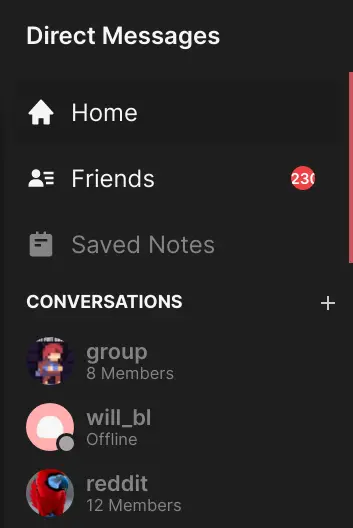
The conversations sidebar as it appears in Stoat for Web
Server Sidebar
The server sidebar is composed of the server banner with the title on top, and a list of categories and channels below.
Categories may be collapsed, and continue to show the active channels when collapsed
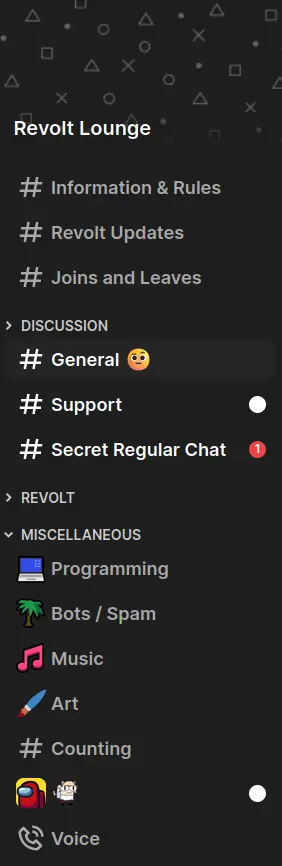
The server sidebar as it appears in Stoat for Web
Ordered Channels Algorithm
- Initialise a set $U$ of uncategorised channel IDs from server channels the client may access.
- Initialise an empty list of categories $C$
- If server.categories are defined, for each category:
- Remove all the channels defined in the category from set $U$
- Add category to list $C$
- If the set $U$ is not empty:
- Find the “default” category if it exists in $C$
- Merge the “default” category channels if they exist with and preceding the set $U$
- Create a category with id=“default” and add it to the start of the list $C$ if it does not exist
- Return the list $C$
Text Channels
Message Grouping Algorithm
Within this algorithm, tail refers to whether the message omits displaying the user’s avatar / username.
This algorithm expects that the rendering of the output list is reversed, if you need it from oldest to newest: either reverse at the end or adapt the logic.
- Let L be the list of messages ordered from newest to oldest
- Let E be the list of elements to be rendered
- Let blockedMessages be a counter initialized to 0
- Let insertedUnreadDivider be a flag initialized to false
- Let lastReadId be the ID of the last read message (or “0” if none)
- For each message M in L:
- Let tail be true
- Let date be null
- Let next be the next item in list L
- If next is not null:
- Let adate and bdate be the times the message M and the next message were created respectively
- If adate and bdate are not the same day:
- Let date be adate
- Let tail be false if one of the following conditions is satisfied:
- Message M and next do not have the same author
- The difference between bdate and adate is equal to or over 7 minutes (420000ms)
- The masquerades for message M and next do not match
- Message M or next is a system message
- Message M replies to one or more messages
- next is before the last read message and the unread divider hasn’t been inserted yet
- Else if next is null:
- Let tail be false
- If the unread divider hasn’t been inserted and message M is before the last read message:
- Let insertedUnreadDivider be true
- Push an unread divider to list E
(type id: 1; cache key: true)
- If the author of message M has a “Blocked” relationship:
- Increment blockedMessages
- Else:
- If blockedMessages > 0:
- Push blocked message count to list E
(type id: 2; count: blockedMessages) - Reset blockedMessages to 0
- Push blocked message count to list E
- Push the message to list E
(type id: 0; cache key: message id:tail)
- If blockedMessages > 0:
- If date is not null:
- Push date formatted as “MMMM D, YYYY” to list E
(type id: 1; cache key: formatted date)
- Push date formatted as “MMMM D, YYYY” to list E
- If blockedMessages > 0 after processing all messages:
- Push blocked message count to list E
(type id: 2; count: blockedMessages)
- Push blocked message count to list E
- If the first element in E is an unread divider (type id: 1):
- Remove it from E (to avoid showing it alone at the bottom)
Element Type IDs
- Type 0: Message entry with tail flag and message content
- Type 1: Message divider (either date divider or unread divider)
- Type 2: Blocked messages counter showing the number of consecutive blocked messages
Note: the Stoat client also caches the objects produced for list E by pushing each object into a Map by their given cache key above, then retrieving them the next time the code is run OR creating a new object if one is not present. This prevents Solid.js from completely rebuilding the DOM whenever the message list updates.
Message View
The message view is finnicky but important to get right, below is the high-level specification:
- The message chunk size is 50.
- A skeleton of messages is displayed where no messages have been loaded and may appear. This includes before initial load, at the top of the list (if more can be loaded), and at the bottom of the list (if more can be loaded).
- If there are no more messages at the top of the channel, there is a conversation start indicator.
- On initial load, a chunk of messages is requested.
- Scroll position is sticky to the bottom of the message view.
- New messages are added to the end when at the bottom of the message view.
- Messages are updated when edited or deleted.
- Scroll position is stable when loading / unloading messages.
- Scrolling into the top or bottom skeletons should load more messages in that direction.
- Up to 150 messages should be rendered (on or off screen) at any given moment.
- Ability to jump and centre to a particular message / unread message.
- Ability to jump to the latest messages.
- On failure to load messages, there should be an exponential backoff.
- There should be locks & signals that prevent double-fetching and cancel unrelated fetches if a new fetch (e.g. up instead of down, end instead of up/down) is initiated.
Icons
For new user interface elements, you should always prefer using Material Symbols over Material Design Icons.
Material Design Icons are no longer maintained and will not receive new icons, while Material Symbols are actively maintained and will continue to receive new icons. Material Symbols also have a more modern design and automatically adjust their look based on the size to ensure they always are clear and legible.
To start using Material Symbols, use the <Symbol> component.
Exception: When your element is part of a larger component that already uses Material Design Icons, you should use the same icon set for consistency. For example, the icons for Settings items currently come from MDI, so you can continue using MDI icons for new Settings items until we migrate all Settings icons to Material Symbols.
Session Lifecycle
To ensure reliability for users on Stoat, clients should implement the following rigid specification for maintaining a session. At a high-level, it should be implemented as a state machine.
flowchart TD
subgraph LOGGED_IN[Logged In - Display Client UI]
CONNECTED
CONNECTING
RECONNECTING
DISCONNECTED
OFFLINE
...
end

subgraph LOGGED_OUT[Logged Out - Display Auth Flow or Loading Indicator]
READY
LOGGING_IN
ONBOARDING
DISPOSE
ERROR
end

READY -->|LOGIN_UNCACHED| LOGGING_IN
READY -->|LOGIN_CACHED| CONNECTING
LOGGING_IN -->|NO_USER| ONBOARDING
LOGGING_IN -->|PERMANENT_FAILURE| ERROR
LOGGING_IN -->|TEMPORARY_FAILURE| ERROR
ONBOARDING -->|CANCEL| DISPOSE
DISPOSE -->|READY| READY
ERROR -->|DISMISS| DISPOSE

LOGGING_IN -->|SOCKET_CONNECTED| CONNECTED
RECONNECTING -->|SOCKET_CONNECTED| CONNECTED
CONNECTING -->|SOCKET_CONNECTED| CONNECTED

ONBOARDING -->|USER_CREATED| LOGGING_IN
CONNECTED -->|TEMPORARY_FAILURE| DISCONNECTED
DISCONNECTED -->|RETRY| RECONNECTING
DISCONNECTED -->|DEVICE_OFFLINE| OFFLINE
RECONNECTING -->|TEMPORARY_FAILURE| DISCONNECTED
CONNECTING -->|TEMPORARY_FAILURE| DISCONNECTED
CONNECTING -->|PERMANENT_FAILURE| ERROR
RECONNECTING -->|PERMANENT_FAILURE| ERROR
OFFLINE -->|DEVICE_ONLINE| RECONNECTING

... -->|LOGOUT| DISPOSE
Implementation Details
The table below describes how each node should behave.
- All nodes SHOULD have corresponding visual feedback.
- Nodes MAY have effects on entry.
- You SHOULD keep track of additional state such as:
- Number of connection failures
| Node | User Interface | Logic |
|---|---|---|
| READY | Show login interface | May transition out by external source. |
| LOGGING_IN | Show loading indicator | On entry, try to authenticate the user. |
| ONBOARDING | Show username selection | May transition out by external source. |
| ERROR | Show the permanent error with option to dismiss it | May transition out by external source. |
| DISPOSE | Show loading indicator | Dispose current client and create a new one. |
| CONNECTING | Show client UI with banner “Connecting” | On entry, try to connect socket. |
| CONNECTED | Show client UI | May transition out by external source. Set connection failures to $ 0 $. |
| DISCONNECTED | Show client UI with banner “Disconnected” | May transition out by external source. Increment connection failures by $ 1 $. If the device is offline, trigger transition to OFFLINE. On entry, set a timer to retry†. On exit, cancel timer. |
| RECONNECTING | Show client UI with banner “Reconnecting” | On entry, invalidate cached data (message history, members list) and try to connect socket. |
| OFFLINE | Show client UI with banner “Device offline” | May transition out by external source. |
† Please use the formula $ (2^x-1) \pm 20 % \textsf{ seconds} $ for the delay where $ x $ is failure count.
// JavaScript implementation
let retryIn =
  (Math.pow(2, connectionFailureCount) - 1) * (0.8 + Math.random() * 0.4);
let retryInMs = retryIn * 1e3;
setTimeout(() => reconnect(), retryInMs);
The following listeners need to be registered that emit the given transitions:
| Listener | Transition |
|---|---|
| Connected to Stoat (and initial data loaded) | SOCKET_CONNECTED |
| Connection to Stoat dropped | SOCKET_DROPPED |
| Received logout event from socket | LOGOUT |
| Connection failed | TEMPORARY_FAILURE |
| Connection failed (session invalid) | PERMANENT_FAILURE |
| Device has gone online | DEVICE_ONLINE |
Socket Details
When implementing your WebSocket connection, you should also implement the following:
- A heartbeat mechanism that sends the Ping event every 30 seconds, and disconnects if a Pong event is not received within 10 seconds.
- A connection timeout mechanism that drops the WebSocket connection if no message is received within 10 seconds of initiating the connection.
User Experience Considerations
- While not strictly relevant to session lifecycle, if you encounter BlockedByShield during login, you should provide a link to the relevant support article.
- Upon encountering a permanent error (session invalid), you should use the known user information to fetch their current flags. This way the message can be tailored to display if: they have been logged out, they disabled their account, their account has been suspended, or their account has been banned.
- When a logout event is received externally, show some sort of indicator that they have been logged out beyond just kicking them to the login screen.
If the connection failure count reaches $ 3 $ or more, query the health service for any outage information.This point is WIP, need considerations about increasing polling rate while connection failures are high, etc.
User Limits
Many interactions a user can have with Stoat are limited by the backend. Any action that has a backend limit should have a matching limit in for-web.
Using Limits
The client contains a limit object at client.limits. The recommended way to access this is through the memoized and null-guarded reactive accessor, instance.limits(). This returns a limits object that has all backend limits that apply to the logged in user, and it takes into account if the user is new, or in the future, any other type of user that has different limits.
Limits can only be accessed from within the Instance context, which close to the root level of the solid context hierarchy. If access to the limits is needed outside a solid component, they must be passed as function parameters.
import { useInstance } from "@revolt/instance";
import { createEffect, Show } from "solid-js";

export function ExampleComponent() {
  const { limits } = useInstance();

  createEffect(() => {
    //Prints the instance's default limit before login is complete, then prints the limit for the current user.
    console.log(limits().message_length);
  });

  //Shows the message when video is enabled on this instance and for this user.
  return <Show when={limits().video}>Video is enabled!</Show>;
}
Using Lingui
Import the macro package wherever you wish to use Lingui, prefer to use the JSX syntax:
import { Trans } from "@lingui/solid/macro";

<Trans>Hi, I am a string!</Trans>

<Trans>There are {5} users in queue.</Trans>
But if necessary, you can use the hook where strings are needed:
import { useLingui } from "@lingui/solid/macro";

const { t } = useLingui();

t`Hello, chat!`;

t`There are {3} people in your walls.`;
If your use case doesn’t fit here, ask a maintainer for guidance.
Plurals
Use the Plural component:
import { Plural } from "@lingui/solid/macro";

<Plural
  value={5}
  one="# Member"
  other="# Members"
/>
Learn more in the Lingui documentation.
Updating catalogs
To update the catalogs, one must run:
mise lingui
This runs mise lingui:extract followed by mise lingui:compile.
NB. don’t run this yourself!
A maintainer will do this regularly & after merge down to main!
Using Dayjs
To use localised dayjs functions (or use any imported plugin), use the time hook:
import { useTime } from "@revolt/i18n";

function Component() {
  const dayjs = useTime();

  return <span>Time at initial render: {dayjs().format("LT")}</span>
}
Using Durations
For-web uses Intl for duration presentation. To display durations to the user, use the useDurationFormat hook:
import { useDurationFormat } from "@revolt/i18n/durations";

function Component() {
  const duration = useDurationFormat();

  // Will display "67 seconds" in the users locale.
  return <span>A funny amount of seconds is: {duration({seconds: 67})}</span>
}
The hook defaults to long formatting. You can pass all standard Intl.DurationFormatOptions options to the duration function.
Translating Errors
To handle an API error, use the hook or use the TranslatedError component. If you can call the TranslatedError component, you should prefer that:
import { TranslatedError } from "@revolt/i18n";

<TranslatedError error={someErrorObject} />
To use the hook:
import { useError } from "@revolt/i18n";

const err = useError();

<span>{err(someErrorObject)}</span>
General Guidelines
This needs expanding on, but some key points!
types.tscontains all the type information for modalsmodals.tsxcontains all the component mounting codemodals/*.tsxare all the individual modals- All modals should use the
Dialogcomponent except in special circumstance - If you take user input, use Form2 (ex. EditUsername)
- If you are performing an action, use Tanstack Mutations (ex. ChannelToggleMature)
NB. take care to usemutateAsyncinstead ofmutateto keep dialog open while pending
NB. bindonErrortoshowErrorfromuseModals() - Do not mix Tanstack and Form2, you’re either using one or the other
They both provide the necessary UX flows, e.g. ‘pending’ actions
Your action onClick handlers can return one of the following:
- A
Promise<any>which on resolution will close the dialog, otherwise will do nothing. - A non-
falsevalue which will close the dialog. - The value
falsewhich will prevent the dialog from closing.
Using the State
The state is available anywhere inside the StateContext. You can only use the state inside a solid component, and if you need it outside a solid component it must be passed as a variable.
You can use the state by using the useState hook. The useState hook returns an object that contains all state stores. When using it inside a component, you should favor destructing the object and using the substates you need instead of the whole state.
import { createEffect } from "solid-js";

import { useState } from "@revolt/state";

function ExampleComponent() {
  // The useState hook returns an object that contains all state stores. There
  // are many state stores available.
  // const state = useState();
  const { auth } = useState();

  createEffect(() => {
    console.log("Auth state changed! New state: ", auth);
  });
}
The state is backed by Solid stores, so it is fully reactive. Any change in the state will result in reactive updates across the entire application.
Available State Stores
Currently, the following state stores are available:
- auth
- draft
- experiments
- keybinds
- layout
- linkSafety
- locale
- notifications
- ordering
- release-notes
- server-folders
- settings
- sounds
- sync
- theme
- voice
Notable states should have a documentation page explaining them.
State Syncing
Any state store that extends AbstractSyncedStore will be synced with the backend. Currently, the following state stores are synced:
- notifications
- ordering
- release-notes
- server-folders
Synced stores are fetched on login and merged with existing stores. Sync stores will also upload to the backend when changed locally.
Global Stores
Most state stores are user stores, but some are global, meaning that their contents remain the same regardless of the logged in user or current instance- even when no user session is present at all. Unlike synced stores, they are still local to the specific client/device.
Currently, the following stores are global:
- auth
In order to declare a store implementation as global, call the AbstractStore super constructor with global set to true.
Note
Like all stores, global stores still require you to be within StateContext in order to read them. StateContext will prevent anything beneath it from rendering until global stores are hydrated from disk, but user stores may initially be configured to default values, until the Client Lifecycle reaches State.Connected.
Miscellaneous State Technicals
Stores are written to the user’s device using IndexedDB via the LocalForage library. IndexedDB was chosen over LocalStorage due to its superior read/write performance and asynchronous, non-blocking access. However, select essential stores (currently only auth) maintain a backup copy in LocalStorage because on mobile OSes (Android/iOS), LocalStorage is immune to automatic cache clearing, while IndexedDB is not.
All data is stored under a single DB named localforage, however this DB contains multiple tables. The global table holds global stores, while user stores are held within tables that follow the name format @<userID> (or <host>@<userID> for alternate instances).
User stores are automatically cleared after logout during the unused store pruning process. Global stores, however, are not cleared.
Creating a New State Store
To add a new state store, you must:
- Create a new state type
- Add the new store type to the
UnsyncedStoreorSyncedStoretype instores/index.ts - Create a new class extending
AbstractStoreorAbstractSyncedStore - Add the new store class to the
Stateclass in index.ts
In addition to this guide offering a starting point to creating a new state store, it will also serve as a guide to the components of the state store.
To create a SyncedStore, follow the instructions here but replace AbstractStore with AbstractSyncedStore and put the store in the SyncedStore type and the SYNCED_KEYS array instead of UnsyncedStore. See existing synced stores for guidance.
Creating a New State Type
Create a file in the stores directory. Use Camel Case. In this example we will be creating a new State Store named Favorites that stores a list of favorite message ids. States should be well documented, so make sure you include doc strings for everything that is publically exported.
In the new file, create the new type:
export type TypeFavorites = {
  /**
   * List of IDs of messages saved as favorites
   */
  favorites: string[];
};
The type can house anything that is able to be marshalled into a string; however, it’s best to keep it simple.
Adding the New Store Type to the Global Store
In stores/index.ts add the new type to the Store type. This list is alphabetical for ease of reading so insert it alphabetically. Favorites would go between experiments and keybinds.
. . .
import { TypeExperiments } from "./Experiments";
import { TypeFavorites } from "./Favorites";
import { TypeKeybinds } from "./Keybinds";
. . .

export type UnsyncedStore = {
  . . .
  experiments: TypeExperiments;
  favorites: TypeFavorites;
  keybinds: TypeKeybinds;
  . . .
}
Creating a New State Class
The Favorites class should extend the AbstractStore class, with the type arguments "favorites", TypeFavorites.
import { State } from "..";

import { AbstractStore } from ".";

// The type from above

export type TypeFavorites = {
  /**
   * List of IDs of messages saved as favorites
   */
  favorites: string[];
};

export class Favorites extends AbstractStore<"favorites", TypeFavorites> {
  constructor(state: State) {
    super(state, "favorites");
  }

  hydrate(): void {}
The hydrate function is for side effects. If your store should be doing something when it initially gets loaded from disk (for example, setting the locale as seen in stores/Locale.ts) then it should be done here. hydrate will be called after the store has cleaned the data from disk and has been saved to the state. Most stores will not need to do anything in hydrate as the store is already reactive.
  default(): TypeFavorites {
    return {
      favorites: [],
    }
  }
The default function returns what the state should consist of if it is not found on disk.
  clean(input: Partial<TypeFavorites>): TypeFavorites {
    const favorites: TypeFavorites = this.default();

    if (Array.isArray(input.favorites)) {
      for (const messageId of input.favorites) {
        if (typeof messageId === "string") {
          favorites.favorites.push(messageId);
        }
      }
    }

    return favorites;
  }
The clean function takes a dirty object from the DB and converts it to a clean object as expected by the store. This function should make no assumptions about the structure of the input as there’s no guarantee that the input hasn’t been changed. It should also strive to be 100% backwards compatible and translate past structures into new structures. If the data in input is not as expected then this function should omit that data and return something as close to default as necessary.
  // AbstractStore is fully implemented. Now helper functions can be implemented.
  // An example helper function:

  /**
   * Add a favorite message by id
   * @param id Message ID
   */
  addFavorite(id: string) {
    this.set("favorites", [...this.get().favorites, id]);
  }
Since you can access the state store class directly, you can directly call helper functions. This makes helper functions a powerful tool for enforcing your new state store to be accessed in a specific way.
Adding the New State Class to the Global State
In index.ts add the new class to the State class. This list is alphabetical for ease of reading so insert it alphabetically. Favorites would go between experiments and keybinds.
. . .
import { Experiments } from "./stores/Experiments";
import { Favorites } from "./stores/Favorites";
import { Keybinds } from "./stores/Keybinds";
. . .

export class State {
  . . .
  experiments = new Experiments(this);
  favorites = new Favorites(this);
  keybinds = new Keybinds(this);
  . . .
Accessing Your New State Store
You should now be able to access your new state store just like other state stores.
import { createEffect } from "solid-js";

import { useState } from "@revolt/state";
import { Button } from "@revolt/ui";

function ExampleComponent() {
  const { favorites } = useState();

  createEffect(() => {
    console.log("Favorites state changed! New state: ", favorites);
  });

  return (
    <Button onPress={() => {favorites.addFavorite("ExampleMessageID")}} />
  )
}
Reference Guide
WIP: currently undergoing some work on this…
Colour
The following Material colour roles are accessible through the CSS variables var(--md-sys-color-*):
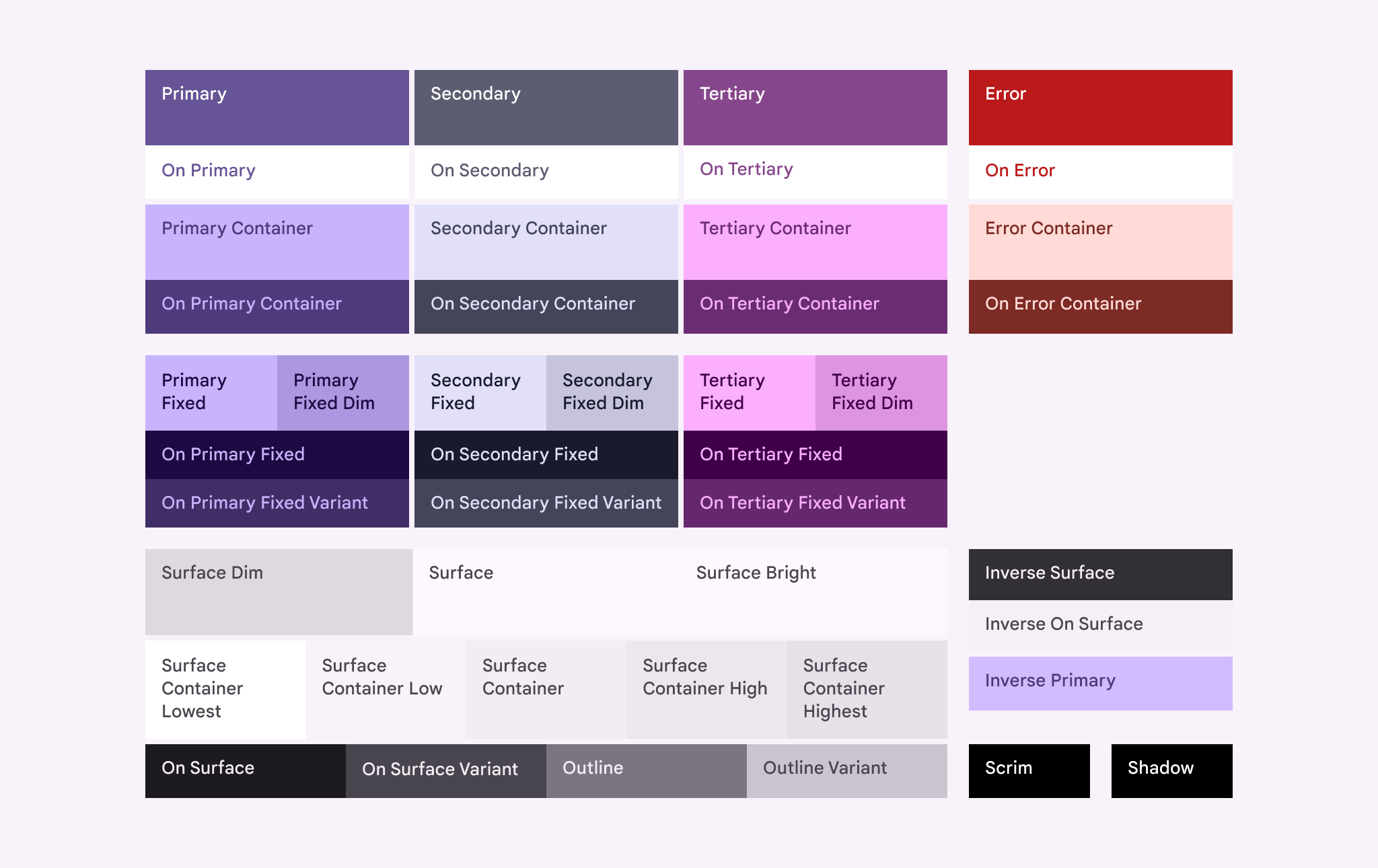
Brand presence colour roles
The following brand presence colour roles are accessible through the CSS variables var(--brand-presence-*):
| Status | CSS-Variable | Hex-Code |
|---|---|---|
| Online | var(--brand-presence-online) | #3ABF7E |
| Idle | var(--brand-presence-idle) | #F39F00 |
| Busy | var(--brand-presence-busy) | #F84848 |
| Focus | var(--brand-presence-focus) | #4799F0 |
| Invisible | var(--brand-presence-invisible) | #A5A5A5 |
Roundness
Border radius values are provided as var(--borderRadius-none|xs|sm|md|lg|li|xl|xli|xxl|full|circle), these correspond to the corner radius scale in Material 3 expressive design.
Learn more here about how to apply the scale: https://m3.material.io/styles/shape/corner-radius-scale
Gaps
Gap values are provided as var(--gap-none|xxs|xs|s|sm|md|lg|x|xl|xxl)
Fonts
Font values are provided by:
- Primary:
var(--fonts-primary) - Monospace:
var(--fonts-monospace)
Typography
Typography tokens are currently fixed.
Transitions
Two transition speeds are specified (in format, <time> <easing>):
- Fast:
var(--transitions-fast) - Medium:
var(--transitions-medium)
Using Form2
Form2 is the primary and recommended way to handle any complex user input to request pipeline.
It is intended to supersede <Form /> with the design goals of making form declarations a bit more involved to avoid complex implicit behaviours from forming, essentially following KISS philosophy.
@todo add information about how to display general errors!
In general, usage looks as follows:
// create your group using solid-forms
const group = createFormGroup({ .. });

// define your handler
// NB. can be a Promise<..>
async function yourSubmitHandler() {
  // do something with group.controls.<control>.value, ..

  if (somethingWrong) {
    throw "error";
    // inserted into errors as 'error'
  }
}

// define a handler to reset the form (if you need this functionality)
function onReset() {
  // group.controls.<control>.setValue(/* whatever it should be / now is */)
}

const submit = Form2.useSubmitHandler(editGroup, onSubmit, onReset);
Then create the form itself in the JSX code:
<form onSubmit={submit}>
  // use a wrapper for TextField that implements control:
  <Form2.TextField
    name="name"
    control={group.controls.name}
    label={t("i18n.key")}
  />
  // include an image picker:
  <Form2.FileInput control={group.controls.icon} accept="image/*" />
  // use the provided buttons for best integration:
  <Row>
    // if appropriate, allow the user to reset the form back to original state
    <Form2.Reset group={editGroup} onReset={onReset} />
    // in-built submission button:
    <Form2.Submit group={editGroup}>
      <Trans>Save</Trans>
    </Form2.Submit>
    // you should also indicate when submission is pending:
    <Show when={editGroup.isPending}>
      <CircularProgress />
    </Show>
  </Row>
</form>
There are examples provided throughout the code, just search for <Form2 in the codebase.
@todo explain this but…
when using with Modals, use !Form2.canSubmit for action
Device
The Device hook located in the @revolt/common package contains all information needed to be responsive to the device. When you must change UI or settings based on device size or orientation, use the Device hook.
Using the useDevice hook
The useDevice hook returns a Device object that contains a layout accessor which returns if the device is on a phone, tablet, or desktop layout based on screen size. It also contains an isMobile boolean, but this relies on the user agent and should not be used unless necessary.
Do not rely on screen size to determine if the device supports touch or is a phone.
import { Show } from "solid-js";
import { styled } from "styled-system/jsx";

import { useDevice } from "@revolt/common";

//Example component using the PandaCSS breakpoints (preferred when only CSS changes are needed)
const DynamicBox = styled("div", {
  base: {
    width: "400px",
    height: "200px",
    background: "red",

    //Activates on tablet AND phone breakpoints
    _tablet: {
      background: "red",
    },

    //Activates on phone breakpoint
    _phone: {
      width: "400px",
      height: "200px",
    },
  },
});

//Example component using the reactive layout var
function ComponentThatUsesDevice() {
  const { layout } = useDevice();

  return (
    <Show when={layout() === "desktop"}>
      This is a large screen!
    </Show>
    <Show when={layout() === "tablet"}>
      This is a medium screen!
    </Show>
    <Show when={layout() === "phone"}>
      This is a small screen!
    </Show>
    <Show when={layout() !== "phone"}>
      This is not a small screen!
    </Show>
  )
}
Feature Detection
Any feature that may not be present on all platforms should have a feature detection added to the Device hook if it will be used in more than one location. A few examples of feature detection:
- Notifications are only supported on desktop browsers
- Touch is only supported on devices with touch
- On screen keyboard management is only supported on newer Chrome based browsers on mobile